Raspberry Pi Mount for the TwoTrees Sapphire S
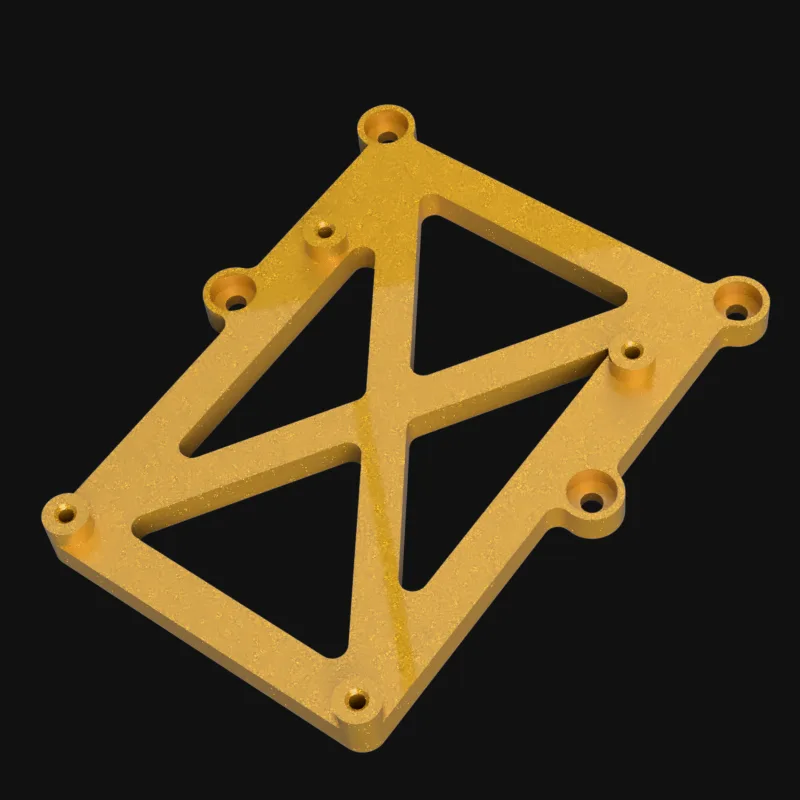
Short answer: The Pi mount for the TwoTrees Sapphire S is a free printable plate that holds a Raspberry Pi 3B, 4 or 5, or a BTT Pi, inside the printer. The STL is free on Printables as model 657312. I made it while moving a Sapphire S to Klipper, and the Lerdge X to FLY CDY board adapter is a separate download.
Updated 16 November 2026. Download the STL files free on Printables. Related: the Lerdge X to FLY CDY adapter and the 120 mm snap-in fan mount.
I published this on 23 November 2023, and on Printables the next day. I was rebuilding a Sapphire S as a second printer for Fenrir prototype parts, and I needed a place to put the Pi running Klipper.
What it is and why I made it
The stock Sapphire S does not give you a tidy home for a Raspberry Pi or a BTT Pi. Once I moved the printer to Klipper, that board had to live in the frame, not on the bench next to it.
This mount is the plate I designed for that job. It fits a Raspberry Pi 3B, 4 or 5, and it also fits a BTT Pi. That is the compatibility list I published with the files.
The photo on this page shows the printed plate: a stiff frame with a large triangular opening, mounting holes, and slots. I have not published the hole sizes or the exact spot in the Sapphire S frame where I fitted it, so I will not guess those here.
What you need
You need the printed mount, a supported Pi, and the fasteners that fit your board and the printer. I have not published a screw list for this file.
- The STL, from Printables model 657312.
- A Raspberry Pi 3B, 4 or 5, or a BTT Pi.
- A TwoTrees Sapphire S. This is not the mount for the SP-5 / Sapphire Plus. That printer has its own parts on the SP-5 upgrades page.
On the same printer I also fitted a Mellow FLY CDY V2 or V3 in place of the original Lerdge X board, and I added a BTT Pi running Klipper. The board adapter is a separate download.
Print notes
I have not published a layer height, wall count or filament for this mount. Use a profile you already trust for a structural part that has to hold a board.
A practical starting point from my other guides, not a measured profile for this STL: PLA or PETG on a 0.4 mm nozzle, 0.2 mm layers, and at least two walls. I usually design tight fits with 0.2 mm clearance, but it depends on the printer, so print a short test if a boss or clip feels tight.
Print the plate so the large face sits on the bed if that face is flat. That keeps the board side even. If the slicer shows overhangs I have not documented, add support only where the preview says you need it.
How to use it
Download the STL, slice it, and print it. Fit the Pi to the plate, then mount the plate in the Sapphire S.
I used this on a Sapphire S that I was converting to Klipper with a BTT Pi, so the cable path to the mainboard matters. Route USB and power so they cannot catch on a moving axis. I have not published a wiring diagram for this setup.
If you are also swapping the mainboard, do the FLY CDY adapter as its own step. The two parts solve two different problems.
FAQ
Does this mount fit a Raspberry Pi 5?
The published fit list is Raspberry Pi 3B, 4 and 5, and BTT Pi, so the Pi 5 is on it.
Does it fit the TwoTrees SP-5 or Sapphire Plus?
This mount is for the Sapphire S, not the SP-5 or Sapphire Plus. For the SP-5 / Sapphire Plus, see TwoTrees SP-5 upgrades.
Do I need the FLY CDY adapter as well?
The FLY CDY adapter is only needed if you are also replacing the original Lerdge X mainboard. The Pi mount and the adapter are separate parts. I used both on my modified Sapphire S.
Where exactly does it sit in the printer?
The exact mounting location and the screw list are still unpublished. The cover photo shows the printed plate. Dry-fit it in the frame before you drill or tap anything.
Is the STL free?
The STL is free on Printables.